Best Video Software in 2026 (Editors, Screen Capture & More Compared)
Author: Yang Dan · Publisher: DirHunt AI (dirhuntai.com) · Desk: Software Reviews
Disclosure: No affiliate links. Every product link goes to an official vendor page.
Review type: Docs-verified against official product/pricing/help pages as of October 21, 2026 (Asia/Shanghai). Hands-on lab is limited this pass (official product UI screenshots on file; timed export benchmarks not run).
Last updated: October 21, 2026 (Asia/Shanghai)
How this differs from our sister guides: Looking only for no-cost masters and watermark rules? Read Best Free Video Editing Software in 2026. Starting from zero and need the easiest first cut? See Best Video Editing Software for Beginners in 2026. This roundup answers a wider question—what people mean when they search best video software: editing first, plus one strong screen-recording-and-edit pick, ranked by platform, price model, and production scene—not the same free-tier or beginner ordering.
Looking for the best video software in 2026? Most US searchers want a video editor—but the practical choice still splits by Mac vs Windows/Linux, subscription vs one-time buy, short-form vs long-form, and whether you also need screen capture for tutorials. We compared six tools against official product and pricing pages so you can pick a lane without buying the wrong license.
We ranked DaVinci Resolve, Adobe Premiere Pro, Final Cut Pro, CapCut, Camtasia, and Descript—covering pro NLEs, social freemium, screen-first training video, and transcript-first talking-head workflows.
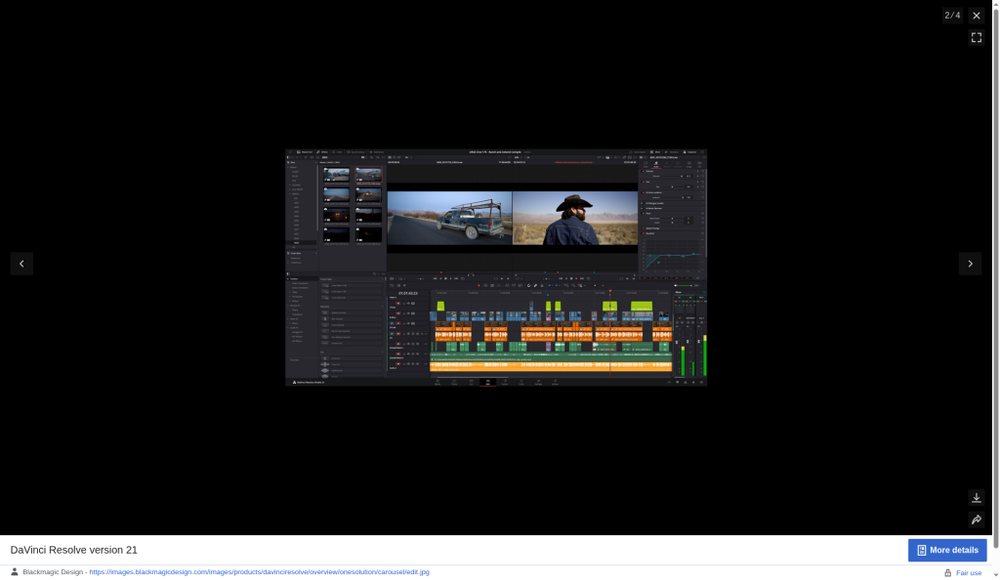
Caption: Hero — DaVinci Resolve Edit page with dual viewers, multitrack timeline, and mixer. Real product UI. Docs-verified free UHD / Studio pricing as of Oct 21, 2026 (Asia/Shanghai).
How to choose in 60 seconds
- Best overall / best value → DaVinci Resolve (free UHD; Studio one-time). - Agency / team / Adobe apps → Adobe Premiere Pro. - Mac-only, buy once (or Creator Studio) → Final Cut Pro. - TikTok / Reels / Shorts speed → CapCut. - Tutorials, SOP, screen demos → Camtasia. - Podcasts / talking-head / edit-as-text → Descript.
Quick picks
| Need | Pick |
|---|---|
| Best overall | DaVinci Resolve |
| Best for teams / Adobe | Adobe Premiere Pro |
| Best for Mac | Final Cut Pro |
| Best for short-form | CapCut |
| Best screen + edit | Camtasia |
| Best transcript-first | Descript |
Table of contents
- How to choose in 60 seconds
- How we evaluated
- Comparison table
-
- DaVinci Resolve
-
- Adobe Premiere Pro
-
- Final Cut Pro
-
- CapCut
-
- Camtasia
-
- Descript
- Platform, price tier & scene matrix
- Which video software should you choose?
- Also considered / not on the main list
- FAQ
- Related reading
- Methodology & update notes
How we evaluated
We ranked tools for people searching best video software in the US—creators, freelancers, small teams, educators, and marketers who need a durable daily driver, not a one-weekend toy.
Criteria
- Core editing strength — Timeline depth, formats, delivery.
- Platform fit — Windows, macOS, Linux, mobile/web where relevant.
- Price model honesty — Free, freemium, subscription, or one-time; what watermarks or feature gates remain.
- Scene fit — Long-form, social vertical, screen tutorials, talking-head.
- Upgrade / collaboration path — Team handoff, cloud, ecosystem apps.
- Learning curve vs ceiling — Can you grow without a forced relearn.
Proof language: For each product we opened the current official product page, pricing or App Store listing, and (where relevant) help docs as of October 21, 2026 (Asia/Shanghai). We logged advertised ceilings, watermark rules, and list prices. Where a detail could not be confirmed on a primary source, we say so. Scores and “best for” labels are editorial synthesis grounded in those docs plus consensus from major 2026 roundups—not fabricated lab FPS charts.
We did not invent features. This is docs-verified, not a claim of full hands-on export benchmarking this pass.
Comparison table
| Software | Best for | Platforms | Price model (as of Oct 21, 2026) | Watermark / free ceiling | Learning curve |
|---|---|---|---|---|---|
| DaVinci Resolve | Overall / value / color+audio | Win, Mac, Linux (+ iPad) | Free; Studio US$295 list (promo US$236 seen on BMD tech specs / sale page) | Free UHD 8-bit up to 60 fps; no watermark | Steep |
| Adobe Premiere Pro | Teams / Adobe ecosystem | Win, Mac (+ mobile) | Single app ~US$22.99/mo (annual billed monthly); CC Pro ~US$69.99/mo | Trial only (no forever free NLE) | Medium–steep |
| Final Cut Pro | Mac speed / one-time | Mac, iPad | US$299.99 once; or Apple Creator Studio US$12.99/mo / US$129/yr | Paid app; trial via Creator Studio | Medium |
| CapCut | Short-form social | Mobile, desktop, web | Free; Pro USD 19.99 reference (sign-in for final) | Capable free; Pro gates assets/AI | Easy |
| Camtasia | Screen record + tutorials | Win, Mac | Free editor watermarked; Essentials US$179.88/yr; Create / Pro higher | Watermark until paid Essentials+ | Easy |
| Descript | Talking-head / transcript edit | Desktop + cloud | Free (limits); Hobbyist ~US$16/mo annual | Free exports watermarked / lower res | Easy (text-first) |
1. DaVinci Resolve — Best overall / best value
Official: blackmagicdesign.com/products/davinciresolve · Comparison / tech specs
Verdict
DaVinci Resolve is our pick for the best video software overall in 2026 when “best” means the highest ceiling per dollar: edit, color, Fusion VFX, Fairlight audio, and (in v21) a Photo page—in one project. The free edition is a real NLE, not a demo. Studio’s one-time license still undercuts years of Premiere subscription for solo finishers.
Who it’s for
Indie filmmakers, YouTubers graduating past CapCut, color-curious editors, and anyone on Windows/Mac/Linux who wants one app to grow into.
Who should skip
Absolute first-timers who need templates this weekend (see our beginners guide). Teams locked into Adobe project exchange.
Key features / pricing
- Pages: Cut, Edit, Fusion, Color, Fairlight, Deliver (+ Photo in Resolve 21).
- Free: virtually all 8-bit formats up to Ultra HD 3840×2160 at 60 fps, multi-user collaboration, HDR grading (per Blackmagic product copy).
- Studio: DaVinci AI Neural Engine, extra Resolve FX / Fairlight FX, noise reduction, text-based editing, Magic Mask, higher bit-depth / fps / resolution.
- Studio list price: US$295 one-time. As of Oct 21, 2026, Blackmagic’s tech specs / Resolve Special page also showed a limited US$236 promotional price (“Was $295”)—confirm checkout before you buy; sale windows end.
Docs-verified (Oct 21, 2026): Free UHD matrix and Studio feature split confirmed on Blackmagic product + tech specs pages; promotional Studio price confirmed on BMD tech specs / event sale page.
Pros & cons
Pros: Unmatched free ceiling; Hollywood-grade color/audio; cross-platform; one-time Studio option.
Cons: Steep learning curve; page-based UI intimidates beginners; heavy GPU appetite on 4K timelines.
Best for / What we noticed
Best when you will actually use color and audio finishing—not only cuts. Expect a rough first week; the free UHD export is the reason Resolve keeps winning “best overall” roundups.
Official download: DaVinci Resolve
2. Adobe Premiere Pro — Best for teams & Adobe ecosystem
Official: adobe.com/products/premiere.html · Creative Cloud plans
Verdict
Premiere Pro remains the safest best video software pick for agencies, freelancers who inherit client Premiere projects, and anyone living in After Effects, Photoshop, Audition, Frame.io, and Firefly. You pay a subscription; you buy editor liquidity and ecosystem handoffs.
Who it’s for
Teams, broadcast-adjacent shops, multi-app Creative Cloud users, mixed Windows/Mac studios.
Who should skip
Budget solo creators who refuse subscriptions (try Resolve or Final Cut). Screen-only trainers (Camtasia is purpose-built).
Key features / pricing
- Traditional track timeline, Lumetri color, multicam, text-based editing, Generative Extend / Firefly-linked features (credit-dependent on plan).
- Dynamic Link with After Effects; Frame.io review on Creative Cloud paths.
- US individual pricing (as of Oct 21, 2026 docs check): Premiere single app about US$22.99/mo on an annual plan billed monthly; Creative Cloud Pro about US$69.99/mo regular (promos vary—confirm on Adobe plans). Not a forever-free NLE.
Docs-verified (Oct 21, 2026): Single-app and CC Pro list prices cross-checked against Adobe Premiere product/plans messaging and current plan roundups citing Adobe’s US annual-billed-monthly figures.
Pros & cons
Pros: Industry default for handoff; deepest Adobe integration; broad format/plugin ecosystem.
Cons: Ongoing cost; can feel heavy; generative features may consume plan credits.
Best for / What we noticed
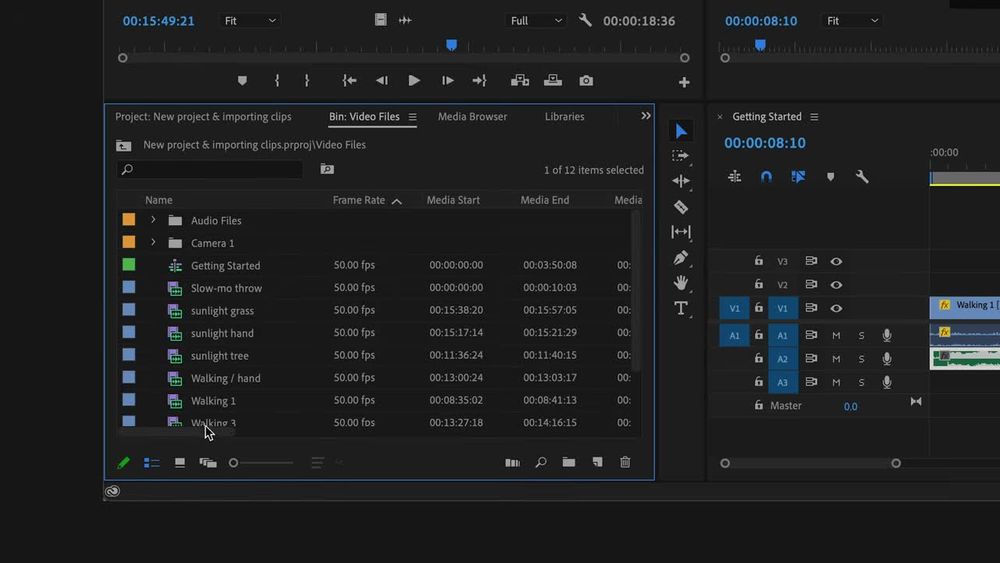
Caption: Adobe Premiere Pro — Editing workspace with Project bin and multitrack timeline (frame from Adobe’s public “Exploring the Panels workspace” Premiere tour on YouTube). Docs-verified pricing as of Oct 21, 2026.
Pick Premiere when collaborators or clients already speak Premiere—not because it is cheaper than Resolve.
Official: Adobe Premiere
3. Final Cut Pro — Best for Mac creators
Official: apple.com/final-cut-pro
Verdict
On Apple silicon, Final Cut Pro is still the fastest path from footage to finish for many solo Mac editors. Magnetic Timeline, roles-based audio, and modern AI assists (Magnetic Mask, Visual Search, Transcript Search, Beat Detection) make it a top best video software pick when you will never need Windows collaborators opening the same project natively.
Who it’s for
Mac freelancers, YouTubers on Apple hardware, creators who prefer buy-once or Apple Creator Studio bundling.
Who should skip
Cross-platform teams; editors who must open Premiere project files daily.
Key features / pricing
- Magnetic Timeline, multicam, captions, color tools, Motion/Compressor companions.
- One-time: Final Cut Pro for Mac US$299.99 (Mac App Store).
- Subscription: Apple Creator Studio includes Final Cut (Mac + iPad) at US$12.99/mo or US$129/yr for new subscribers after a 30-day trial (educator pricing lower)—per Apple’s Final Cut Pro FAQ as of our Oct 21, 2026 check.
Docs-verified (Oct 21, 2026): One-time and Creator Studio prices confirmed on Apple Final Cut Pro page FAQ.
Pros & cons
Pros: Excellent Apple silicon performance; clear ownership options; strong modern AI assists.
Cons: Mac/iPad only; weaker for multi-seat Windows shops; Magnetic Timeline is a learning rewire for track-timeline veterans.
Best for / What we noticed
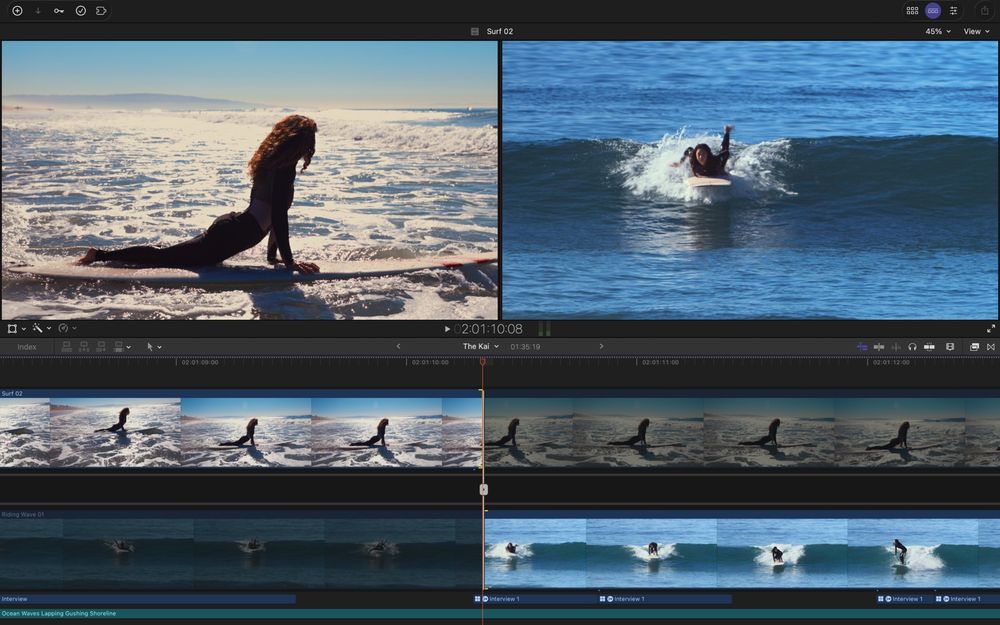
Caption: Final Cut Pro — multicam viewers and Magnetic Timeline (Mac App Store product screenshot). Pricing verified on Apple.com as of Oct 21, 2026.
If your whole pipeline is Apple, Final Cut often beats Premiere on speed-per-dollar over two+ years.
Official: Final Cut Pro
4. CapCut — Best for short-form social
Official: capcut.com · Pricing
Verdict
CapCut is the default best video software answer for Shorts, Reels, and TikTok: templates, auto-captions, vertical presets, and phone-to-desktop continuity. Treat it as freemium—Pro gates many AI/assets—and read privacy notes before client-confidential work.
Who it’s for
Social-first creators, marketers shipping vertical clips weekly, beginners who will later graduate to Resolve/Premiere for long-form.
Who should skip
Long documentary timelines; privacy-sensitive enterprise footage without a policy review.
Key features / pricing
- Templates, effects, captions, multi-platform apps.
- Free plan for basics; Pro listed at USD 19.99 and Ultra at higher tiers on CapCut’s pricing page—CapCut states displayed pricing is reference-only and final price appears after sign-in.
Docs-verified (Oct 21, 2026): Free / Pro / Ultra structure and reference Pro USD 19.99 confirmed on CapCut pricing page.
Pros & cons
Pros: Fastest modern social look; cross-device; strong free on-ramp.
Cons: Long-form gets sluggish; Pro paywalls; ByteDance ownership / data considerations for some buyers.
Best for / What we noticed

Caption: CapCut — official creative/templates marketing still (vendor CDN). Freemium Pro gates verified on CapCut pricing as of Oct 21, 2026.
Use CapCut to publish verticals this week; do not force it to replace Resolve for a feature-length grade.
Official: CapCut
5. Camtasia — Best screen recording + tutorial video software
Official: techsmith.com/camtasia · Store / pricing
Verdict
When “video software” means capture the screen, annotate it, and ship training, Camtasia wins this roundup’s non-pure-NLE seat. Rich Recording (screen, camera, mic, system audio on separate layers), cursor effects, quizzes/SCORM, and watermark-free exports on paid plans make it the practical pick for L&D, SaaS demos, and educators.
Who it’s for
Instructional designers, customer education, internal SOP videos, software marketers.
Who should skip
Narrative filmmakers and colorists (Resolve/Premiere/FCP). Anyone who only needs a free watermark-free social cut (CapCut / Clipchamp / Resolve free).
Key features / pricing
- Screen + webcam recording, multitrack editor, annotations, cursor effects, captions, Audiate text-based editing on higher plans.
- Free Camtasia Editor: full editing features with watermarked exports until Essentials / Create / Pro (or business license)—per TechSmith FAQ.
- Individual plans (US, billed yearly, as of Oct 21, 2026 store check): Starter US$39/yr (watermarked editor); Essentials US$179.88/yr; Create (AI script/voiceover tier); Pro US$599/yr. Exact Create list price and promo Pro rates can change on the store—confirm at checkout.
Docs-verified (Oct 21, 2026): Watermark-on-free-editor rule and Essentials / Pro yearly prices confirmed on TechSmith Camtasia product + store pages.
Pros & cons
Pros: Purpose-built for tutorials; cursor/annotation clarity; Windows + Mac parity.
Cons: Not a cinema NLE; paid plans required for clean exports; AI features concentrated on Create/Pro.
Best for / What we noticed
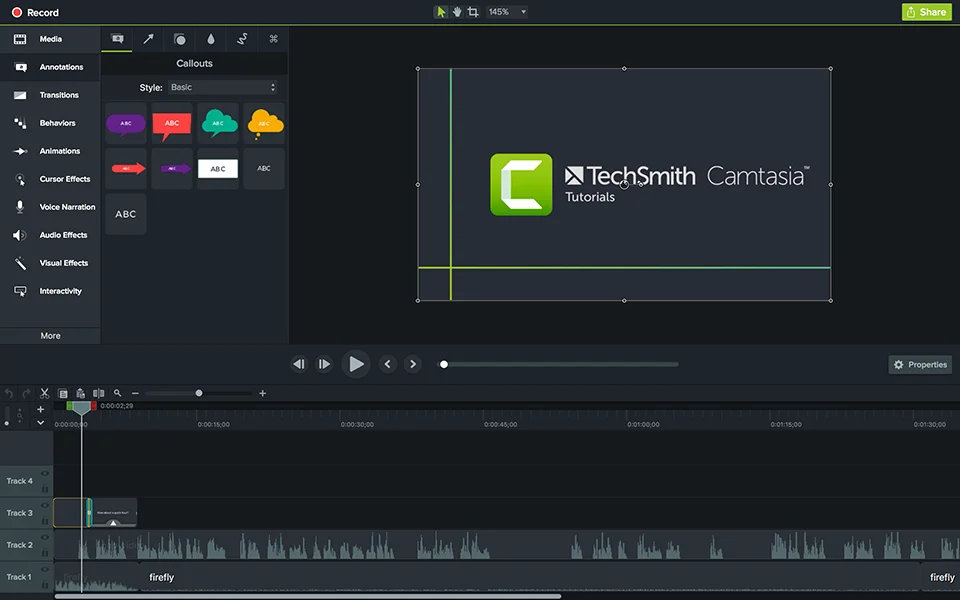
Caption: Camtasia — official product UI showing Annotations/Callouts and timeline (TechSmith CDN). Watermark and plan pricing verified Oct 21, 2026.
If your “video” is mostly UI + voiceover, Camtasia beats fighting Premiere’s learning curve.
Official: Camtasia
6. Descript — Best transcript-first / talking-head
Official: descript.com · Pricing
Verdict
Descript is the best video software pick when the timeline is mostly people talking: edit the transcript, remove filler, Studio Sound, and publish clips without living on a traditional NLE. Different job than CapCut (social templates) or Camtasia (screen demos).
Who it’s for
Podcasters with camera, interview shows, async team updates, creators who think in scripts.
Who should skip
Music videos, complex multicam narrative, heavy motion graphics.
Key features / pricing
- Text-based editing, AI tools (Underlord, filler removal, eye contact, etc.), Rooms recording, stock library by plan.
- Free: start with limits; watermark and lower export ceilings.
- Hobbyist: about US$16/mo on annual (US$24 monthly)—10 media hours, 1080p watermark-free. Creator ~US$24/mo annual for more hours / 4K. Figures from Descript pricing as of Oct 21, 2026.
Docs-verified (Oct 21, 2026): Hobbyist/Creator annual vs monthly figures and free vs paid watermark language confirmed on Descript pricing page.
Pros & cons
Pros: Fastest dialogue cleanup; approachable for non-editors; strong AI assist stack.
Cons: Media-hour metering; not a finishing suite for cinema color; cloud-centric habits.
Best for / What we noticed
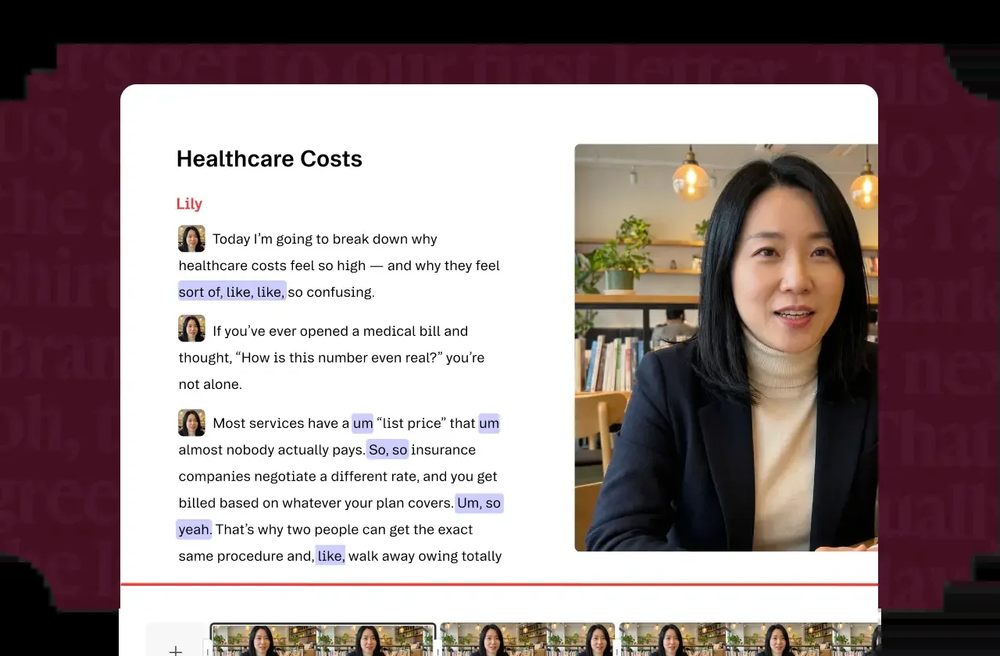
Caption: Descript — transcript-first editor UI (product still on file). Plan limits verified on Descript pricing as of Oct 21, 2026.
If you delete “um” more than you grade skin tones, Descript is the right video software.
Official: Descript
Platform, price tier & scene matrix
| If you… | Prefer | Avoid forcing |
|---|---|---|
| Need max capability per dollar | Resolve (free → Studio) | Paying Premiere only for solo YouTube |
| Must hand off to Adobe teams | Premiere Pro | Final Cut as the studio standard |
| Edit only on Mac & want ownership | Final Cut Pro | CapCut as your only long-form tool |
| Ship vertical social daily | CapCut | Resolve’s learning curve on day one |
| Record SOPs / product tours | Camtasia | A pure social template app |
| Cut interviews by transcript | Descript | Filmora-style effect packs as the core |
Which video software should you choose?
- Start with the scene, not the brand: social → CapCut; tutorial screen → Camtasia; talking-head → Descript; cinema/YouTube long-form → Resolve or Premiere/FCP.
- Then apply platform: Mac-only speed → Final Cut; mixed OS / agency → Premiere; Win/Mac/Linux value → Resolve.
- Then apply budget: free UHD ceiling → Resolve; refuse subscriptions → Resolve Studio or Final Cut one-time; already pay Creative Cloud → Premiere is often already included.
- Need free-only ceilings? Jump to our free video editing roundup. Need easiest first app? Use the beginners roundup.
Also considered / not on the main list
| Tool | Why it didn’t make the main six |
|---|---|
| VEGAS Pro | Solid Windows mid-pro option; less universal than Premiere/Resolve for mixed teams. |
| Filmora | Strong easy desktop—covered heavily in our beginners guide; overlapping “easy paid” lane. |
| Clipchamp / iMovie | Excellent free OS-bundled starters—owned by the free & beginners articles. |
| Avid Media Composer | Broadcast episodic king; overkill and priced for facilities, not this generalist shortlist. |
| HandBrake | Best-in-class open transcoder, not an editor—useful companion, not a “best video software” substitute. |
| VLC | Player/converter, not a creative timeline. |
FAQ
What is the best video software overall in 2026?
For most people optimizing capability per dollar, DaVinci Resolve (free or Studio) is our overall pick. Choose Premiere Pro if your collaborators live in Adobe, or Final Cut Pro if you are Mac-only and prefer Apple’s ownership options.
Is Premiere Pro worth it vs DaVinci Resolve?
Yes—if you need Adobe ecosystem handoffs, Frame.io/team habits, or client Premiere projects. If you are a solo finisher who wants color + audio in one buy-once (or free) app, Resolve usually wins on cost.
What is the best video software for YouTube?
Long-form: Resolve or Premiere (or Final Cut on Mac). Shorts-heavy channels often draft in CapCut then finish long videos in a desktop NLE.
What is the best video software for screen recording?
Camtasia—screen capture and tutorial editing are the product. Resolve/Premiere can edit screen footage but are not purpose-built for cursor effects and training export workflows.
Does “best video software” only mean editors?
In US SERP intent, usually yes—but many shoppers also evaluate screen recorders and transcript editors. We keep the main list editor-led and include Camtasia as the one strong adjacent pick.
Are there affiliate links in this article?
No. Links go to official vendor pages only.
Related reading
- Best Free Video Editing Software in 2026 — watermark rules and free export ceilings.
- Best Video Editing Software for Beginners in 2026 — easiest first-cut tools.
- Best Business Management Software in 2026 — if your next software decision is ops, not timeline.
- Best Free Drawing Software in 2026 — adjacent creative tooling.
Methodology & update notes
- As of: October 21, 2026 (Asia/Shanghai).
- Method: Docs-verified against official product, pricing, App Store, and help pages. UI screenshots are real product or official marketing/App Store/Adobe public tour frames on file under ./publish/video-software-2026-10-21/screenshots/. Timed export lab not run this pass.
- No affiliate relationships influenced ranking.
- Changelog (2026-10-21): Initial publish for keyword best video software; main six locked to differentiate from free and beginners sister posts; Camtasia included as screen+edit adjacent pick; Resolve Studio promo price noted as time-limited where BMD displays it.