Best Writing Software in 2026 (Long-Form, Grammar & AI Assist)
Author / Publisher: Yang Dan · Desk: Software Reviews Desk · Brand: DirHunt AI
Contact: reviews@dirhuntai.com · About: /about · Methodology: /methodology
Disclosure: No affiliate links. Every product link goes to an official vendor page.
Review type: Docs-verified against official product, pricing, FAQ, and download pages. Hands-on lab is limited this pass (no multi-week manuscript diary).
Last updated: October 21, 2026 (Asia/Shanghai)
Looking for the best writing software that actually matches how you draft—novels, reports, blog posts, or academic papers—without defaulting to “just another AI chatbot”? In 2026 that phrase usually means a practical stack: a place to compose and structure, a layer that catches grammar and tone, and (optionally) tools that simplify prose or sync across devices.
We compared seven contenders against official product and pricing pages as of October 21, 2026, covering long-form / distraction-free drafting, mainstream word processors, grammar assistants, deep manuscript reports, and readability polish—so the list is not a pile of generative chatbots.
How to choose in 60 seconds
- Writing a novel, thesis, or research-heavy book → Scrivener. - Need office-standard documents, track changes, and Copilot → Microsoft Word (Microsoft 365). - Want always-on grammar, tone, and rewrites across apps → Grammarly. - Need deep style / pacing / manuscript reports (especially fiction) → ProWritingAid. - Prefer a clean Markdown library on Mac / iPhone / iPad → Ulysses. - Need free real-time collaboration → Google Docs. - Want a fast readability pass (hard sentences, adverbs, passive voice) → Hemingway Editor.
Quick picks
| Need | Pick |
|---|---|
| Best for long-form books | Scrivener |
| Best all-purpose word processor | Microsoft Word |
| Best grammar & tone assistant | Grammarly |
| Best deep manuscript editing | ProWritingAid |
| Best distraction-free (Apple) | Ulysses |
| Best free collaborative writing | Google Docs |
| Best readability polish | Hemingway Editor |
Table of contents
- How to Choose in 60 Seconds (box above)
- What “Writing Software” Means in 2026
- How We Evaluated
- Quick Comparison Table
-
- Scrivener
-
- Microsoft Word
-
- Grammarly
-
- ProWritingAid
-
- Ulysses
-
- Google Docs
-
- Hemingway Editor
- Comparison Table (Pricing & Limits)
- Also Considered
- Which Tool Should You Choose?
- FAQ
- Methodology & Update Notes
- Related Reading
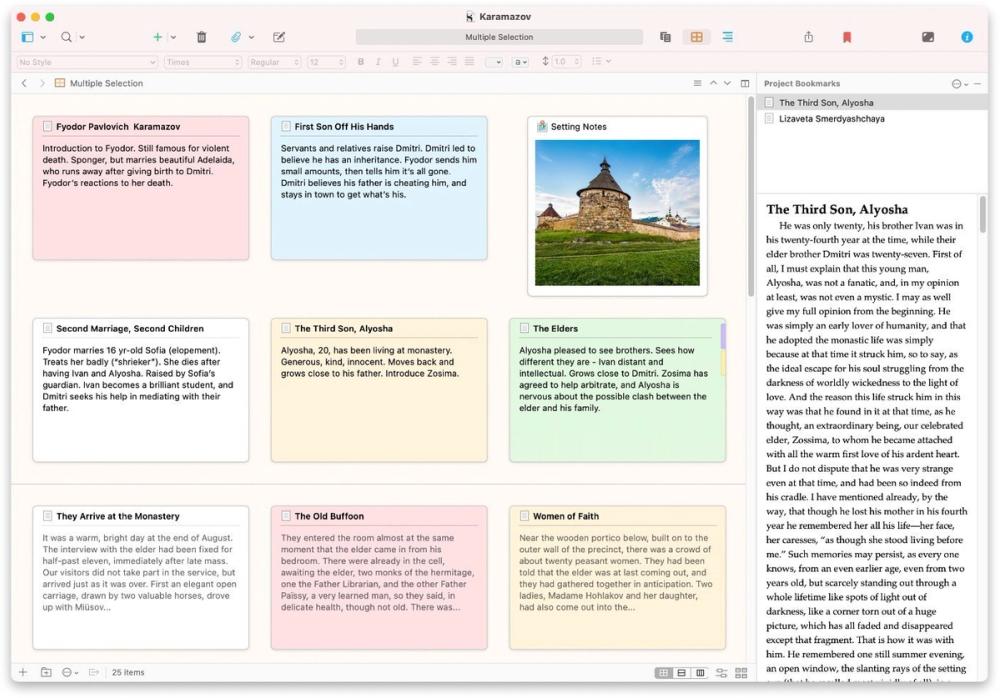
Caption: Real Scrivener corkboard + inspector UI (official Literature & Latte product marketing asset, as of Oct 21, 2026). Used as list hero — not a logo collage.
What “Writing Software” Means in 2026
Writing software is an umbrella for tools that help you draft, structure, revise, and export prose. It overlaps with:
| Category | Typical focus | Overlap with “writing software” |
|---|---|---|
| Long-form / novel apps | Binder, corkboard, research pane, compile | High (Scrivener, Ulysses) |
| Word processors | Page layout, styles, track changes, citations | High (Word, Google Docs) |
| Grammar / style assistants | Real-time corrections, tone, plagiarism | Layer on top of wherever you write (Grammarly, ProWritingAid) |
| Readability editors | Hard-sentence highlights, grade level | Narrow but useful (Hemingway) |
| Generative AI chatbots | Prompt → draft | Adjacent—not our main shortlist (see Also considered) |
Editorial boundary for this guide: we shortlisted tools that US searchers commonly mean by best writing software—composition environments and editing layers—not pure chatbots, not pure note-taking PKM apps, and not layout-only desktop publishers. That is why ChatGPT / Jasper and Obsidian / Notion appear under Also considered, not the main seven.
How We Evaluated
We ranked tools for US writers and knowledge workers comparing writing software for everyday drafting—novelists, freelancers, students, and professional communicators—not enterprise CMS procurement committees.
Criteria
- Fit to a clear writing job — Long-form structure, everyday documents, grammar layer, or readability pass.
- Honest free / paid model — Published list prices, trials, and free-tier limits (as of Oct 21, 2026).
- Platform coverage — Windows / macOS / web / mobile called out when material.
- Export & handoff — DOCX, PDF, EPUB, Markdown, or compile workflows that do not trap your manuscript.
- Learning curve vs power — Can a solo writer start in a day, or is this a multi-week investment?
Honesty note (not “Tested” theatre): This pass is docs-verified. We opened official product, pricing, download, and FAQ pages dated around October 21, 2026 (Asia/Shanghai) and cross-checked mainstream roundups (Reedsy writing-tools lists, PCMag writing-apps coverage, selfpublishing.com book-software guides). We did not run multi-week novel labs or timed typing benchmarks. Where a dollar amount could not be confirmed on a live US pricing surface (notably some JS-rendered promo rates), we omit or flag rather than invent.
Quick Comparison Table
| Software | Best for | Platforms | Free path? | Paid starting point (as of Oct 21, 2026) | Main drawback |
|---|---|---|---|---|---|
| Scrivener | Long-form books / research projects | macOS, Windows, iOS (licenses sold separately) | 30-day trial (usage days) | $59.99 Mac or Windows; iOS $23.99; cross-grade $37.95 | Learning curve; no native real-time co-authoring |
| Microsoft Word | Everyday professional documents | Windows, Mac, web, mobile (via Microsoft 365) | Word for the web (limited) | Microsoft 365 Personal $99.99/yr or $9.99/mo | Subscription for full desktop + Copilot features |
| Grammarly | Real-time grammar & tone | Browser, desktop, mobile, Docs/Word integrations | Free basic checks | Pro from about $12/mo (plans page) | Deep manuscript reports thinner than ProWritingAid |
| ProWritingAid | Manuscript-style reports | Web, desktop, Word/Docs/Scrivener integrations | Free (daily caps; ~500 words/check) | Premium ~$120/yr (or $30/mo billed monthly) | Suggestion volume can feel noisy |
| Ulysses | Distraction-free Markdown library | Mac, iPhone, iPad only | Free trial | $39.99/yr or $5.99/mo (US App Store) | Apple-only; subscription |
| Google Docs | Free collaboration | Web + mobile apps | Free (with Google account) | Workspace paid plans for orgs | Weak for novel-scale binder/corkboard workflows |
| Hemingway Editor | Readability polish | Web (free highlights); Desktop $19.99; Editor Plus subscription | Free web highlighter | Desktop $19.99; Editor Plus from $100/yr (Individual 5K) | Not a full drafting / project manager |
1. Scrivener — Best for long-form books and research-heavy projects
Official: literatureandlatte.com/scrivener · Pricing / buy via Downloads & store · Cross-grade: literatureandlatte.com/crossgrading
Verdict: If “writing software” means growing a manuscript in pieces—scenes, chapters, research PDFs, corkboard cards—Scrivener remains the category benchmark in 2026. It is not the fastest tool for a one-page memo.
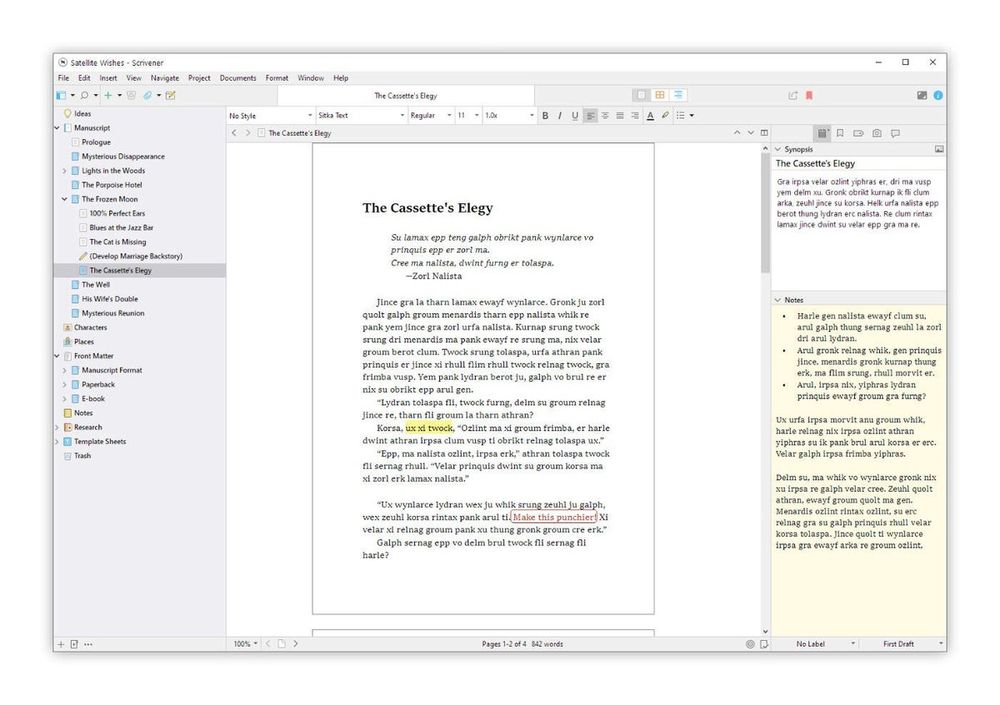
Caption: Scrivener binder + editor page view (official product marketing asset). Docs-verified Oct 21, 2026.
Key features
- Binder + Scrivenings — Break a draft into sections of any size, then edit them as one continuous document.
- Corkboard & Outliner — Index-card planning and metadata-rich outlines that rearrange the manuscript when you drag.
- Research pane — Keep PDFs, images, web archives, and notes beside the draft.
- Compile — Export to Word, PDF, EPUB, Final Draft, plain text, and submission-ready formatting presets.
- Composition mode, targets, snapshots — Full-screen drafting, word goals, and version snapshots before risky rewrites.
Pricing (as of Oct 21, 2026)
- macOS: $59.99 one-time (Scrivener 3.x; minor updates free).
- Windows: $59.99 one-time (separate license).
- iOS: $23.99 (App Store; separate license).
- Cross-grade: second desktop platform $37.95 when you already own the other.
- Trial: full-featured for 30 days of use on Mac/Windows.
Docs check (Oct 21, 2026): Official FAQ and “Why can’t you pay once?” pages still list $59.99 / $59.99 / $23.99 and household licensing for non–App Store desktop purchases. Confirm live store checkout before buying—sales tax may apply.
Pros
- Purpose-built for novels, nonfiction books, scripts, and theses.
- One-time desktop purchase (not forced SaaS for core drafting).
- Strong export/compile story for publishers and self-publishers.
Cons
- Steeper learning curve than Docs or Word.
- Licenses are per platform; sync is DIY (e.g., Dropbox)—not Google Docs–style live co-editing.
- UI can feel dense until the tutorial clicks.
Best for / Who should skip
- Best for: Novelists, academics, and nonfiction writers managing research + long structure.
- Skip if: You only write short collaborative docs, or you refuse any learning curve.
What we noticed
Scrivener still wins the “forest and trees” job that chatbots and flat Docs folders do not solve: reorder structure without copy-paste chaos. Pair it with Grammarly or ProWritingAid for line editing rather than expecting Scrivener to replace a grammar layer.
Official link: Scrivener overview
2. Microsoft Word — Best all-purpose professional writing
Official: microsoft.com/microsoft-365/word · Plans: Microsoft 365 for individuals
Verdict: For US workplaces, schools, and freelancers who must ship .docx with track changes, Word is still the default best writing software in the “professional document” sense—especially with Microsoft 365 Copilot features on paid plans.
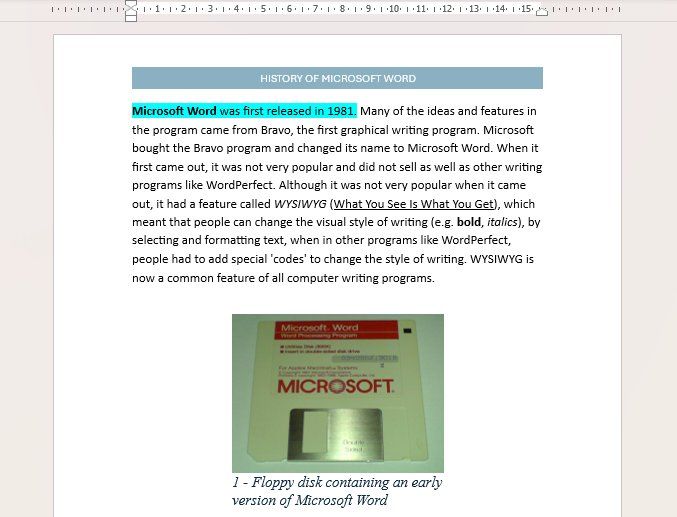
Caption: Microsoft Word editing UI (Wikimedia Commons public screenshot). Illustrative of Word’s document workspace; ribbon/feature set varies by version. Captured reference as of Oct 21, 2026 review pass.
Key features
- Full desktop word processor: styles, sections, footnotes, mail merge, templates.
- Track Changes / comments — Industry standard for editorial handoff.
- Word for the web — Browser drafting with real-time co-authoring.
- Editor / Copilot (plan-dependent) — Spelling/grammar plus generative assistance inside Word on Microsoft 365 tiers.
- Cross-device: PC, Mac, mobile; cloud via OneDrive.
Pricing (as of Oct 21, 2026)
- Word for the web: Free with a Microsoft account (basic spelling/grammar, limited templates/storage).
- Microsoft 365 Personal: $99.99/year or $9.99/month — desktop Word + 1 TB OneDrive + Copilot features for one person (usage limits apply).
- Microsoft 365 Family: $129.99/year or $12.99/month — up to six people; AI features for subscription owner only.
- Microsoft 365 Premium: $199.99/year or $19.99/month — higher Copilot usage (confirm live store).
Docs check (Oct 21, 2026): Figures taken from Microsoft’s US Microsoft 365 individual / Word product pages. Promos and regional taxes can change the checkout total.
Pros
- Universal file format for clients, agents, and universities.
- Mature accessibility, citation, and layout tools.
- Strong collaboration when everyone is in Microsoft 365.
Cons
- Full desktop + AI stack is a subscription.
- Long novels are writable but clumsier than Scrivener’s binder model.
- Feature surface is huge—easy to feel overserved for simple drafts.
Best for / Who should skip
- Best for: Professionals, students, and teams living in .docx workflows.
- Skip if: You want a one-time novel app or Apple-only Markdown minimalism.
What we noticed
Word is the compatibility backbone. Many “writing software” stacks still end with “Compile / Export to Word” for agents and presses—even when drafting happened in Scrivener.
Official link: Microsoft Word
3. Grammarly — Best real-time grammar and tone assistant
Official: grammarly.com · Plans: grammarly.com/plans
Verdict: Grammarly is the ubiquitous editing layer—browser, desktop, mobile, Google Docs, and more. It is the best default when you want corrections wherever you type, not a second manuscript IDE.
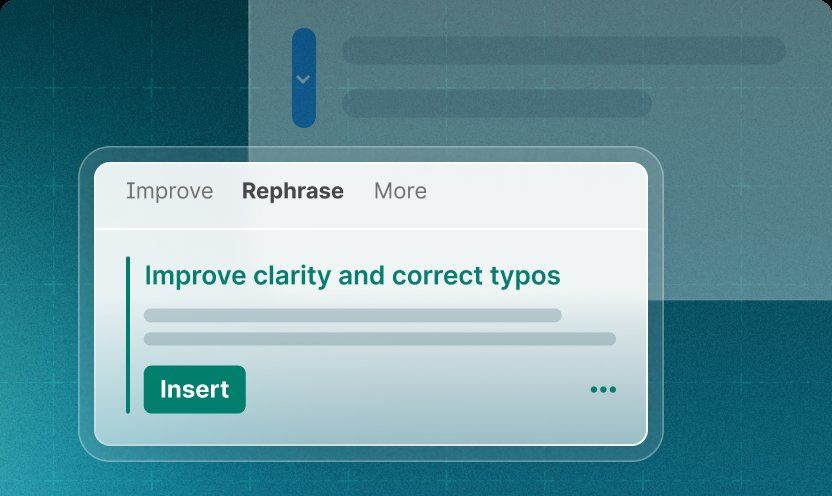
Caption: Grammarly paragraph / rewrite product UI (official Grammarly marketing asset). Docs-verified Oct 21, 2026.
Key features
- Real-time grammar, spelling, punctuation, clarity, and tone.
- Full-sentence rewrites and tone adjustments on Pro.
- Plagiarism and AI-text detection on paid tiers (per plans matrix).
- AI prompts for generation (Free: 100/mo; Pro: 2,000/member/mo; Enterprise: unlimited—per plans page).
- Team style guides / brand tones on higher tiers.
Pricing (as of Oct 21, 2026)
- Free: $0 — core mistake catching; limited AI prompts.
- Pro: About $12/mo on the public plans page (confirm monthly vs annual at checkout; trials common).
- Enterprise: Contact sales (via Superhuman Go positioning on plans page).
Docs check (Oct 21, 2026): Live grammarly.com/plans showed Free / Pro ($12) / Enterprise. Older “Premium / Business” naming is being migrated to Pro in Grammarly’s own FAQ copy—use the live matrix.
Pros
- Works across email, Docs, social, and desktop editors.
- Fast, low-friction suggestions for everyday prose.
- Clear free tier for basic proofreading.
Cons
- Not a long-form project manager (no corkboard/binder).
- Pro cost adds up beside other subscriptions.
- Fiction voice can be over-corrected if you accept every suggestion.
Best for / Who should skip
- Best for: Professionals, students, and bloggers who write in many apps.
- Skip if: You need chapter-level pacing reports—look at ProWritingAid.
What we noticed
Treat Grammarly as insurance on top of Scrivener/Word/Docs, not as a replacement for structure tools. Turn off aggressive style rules when writing dialogue-heavy fiction.
Official link: Grammarly
4. ProWritingAid — Best deep manuscript editing and style reports
Official: prowritingaid.com · Pricing: prowritingaid.com/en/App/Purchase
Verdict: When “writing software” means improve this novel before the human editor sees it, ProWritingAid’s report stack (style, echoes, pacing, readability, document-type goals) still out-depths Grammarly for long manuscripts.
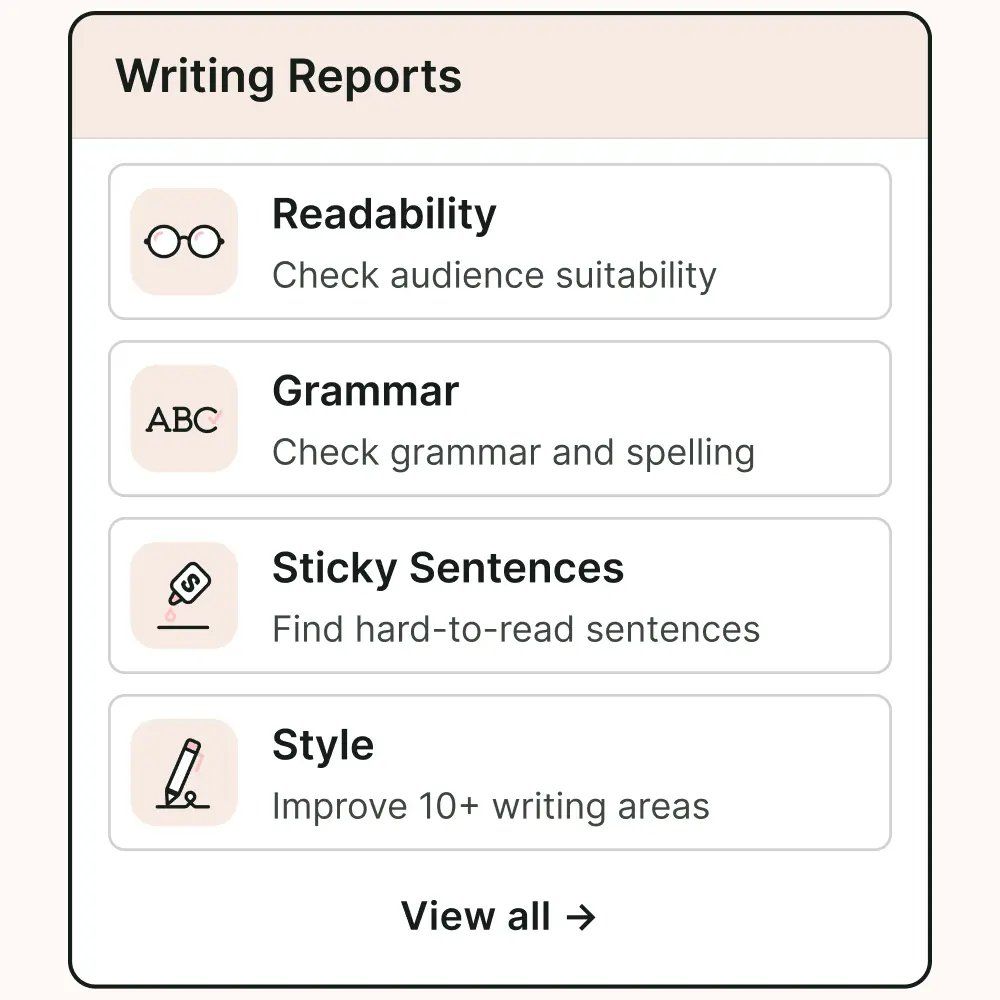
Caption: ProWritingAid writing-reports product marketing UI (official asset). Docs-verified Oct 21, 2026.
Key features
- Large library of line-editing / style reports plus grammar/spelling.
- Integrations: Word, Google Docs, Scrivener, browser, desktop.
- Story-oriented tools (Chapter Critique, Story Credits analyses) on paid tiers.
- Document types (40+) to tune suggestions.
- Lifetime license option historically offered—confirm current checkout (annual/monthly dominate the public page).
Pricing (as of Oct 21, 2026)
- Free: Grammar basics; ~500 words per check; daily caps on reports/rephrases/Sparks (see purchase page).
- Premium: About $30/mo billed monthly, or about $120/yr when billed yearly (public purchase page).
- Premium Pro: Higher Sparks / Chapter Critique limits and better Story Credit discounts (confirm live tier cards—page layout is JS-heavy).
Docs check (Oct 21, 2026): Official purchase FAQ still states free users get suggestions for 500 words at a time; paid unlocks unlimited document length. Refund window for yearly/lifetime is short (three days)—read the policy before buying.
Pros
- Manuscript-aware depth Grammarly does not fully match.
- Works inside Scrivener—strong combo for novelists.
- Educational for learning your own repetition habits.
Cons
- Can overwhelm with too many flags at once.
- Subscription pricing; monthly is notably higher than annual.
- Story Credits / advanced story tools are a separate mental model (and cost).
Best for / Who should skip
- Best for: Fiction and long-form authors doing serious self-editing.
- Skip if: You only need light email grammar—Grammarly Free/Pro is simpler.
What we noticed
Run one report family at a time (e.g., echoes, then sticky sentences) instead of accepting a wall of highlights. Pair with Scrivener: draft there, analyze here.
Official link: ProWritingAid
5. Ulysses — Best distraction-free writing for Mac and iOS
Official: ulysses.app · Pricing: ulysses.app/pricing
Verdict: Ulysses is the polished Markdown library for Apple-only writers who want focus, goals, and clean export—without Scrivener’s denser project chrome.
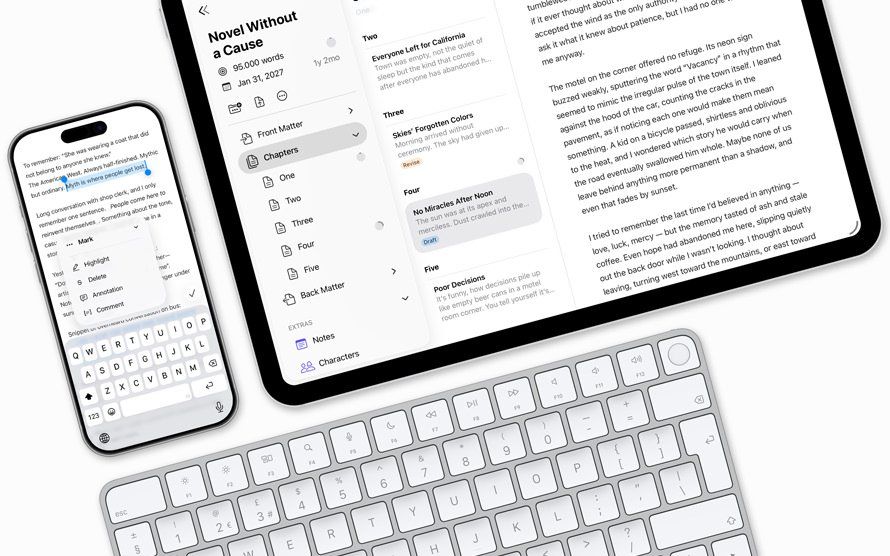
Caption: Ulysses product / library marketing UI (official ulysses.app asset). Docs-verified Oct 21, 2026.
Key features
- Unified library of sheets/groups; Markdown-based writing.
- iCloud sync across Mac, iPhone, iPad.
- Goals, keywords, attachments; export to DOCX, PDF, EPUB, HTML, etc.
- Direct publishing hooks (e.g., Medium / WordPress—confirm current connectors in-app).
- Apple Family Sharing included on subscription.
Pricing (as of Oct 21, 2026)
- $39.99 per year or $5.99 per month (US App Store pricing quoted on ulysses.app/pricing).
- Student discounts and volume/business licensing available (see pricing page).
- Free trial via App Store.
Docs check (Oct 21, 2026): Official pricing page states US prices; local App Store amounts may differ.
Pros
- Beautiful, calm interface that stays out of the way.
- Excellent Apple-ecosystem sync story.
- Exports are clean for blogs and ebooks.
Cons
- No Windows / Android.
- Subscription (contrast Scrivener’s one-time desktop license).
- Less structural firepower than Scrivener for huge research novels.
Best for / Who should skip
- Best for: Mac/iPhone writers who live in Markdown and want focus.
- Skip if: You need Windows, or you want corkboard-heavy novel architecture.
What we noticed
Ulysses wins on daily writing feel. If your “book” is really a set of essays or a memoir with light structure, it can replace Scrivener; if you juggle 40 research PDFs and dual plotlines, Scrivener still scales better.
Official link: Ulysses
6. Google Docs — Best free collaborative writing
Official: google.com/docs/about · Workspace: workspace.google.com/products/docs
Verdict: For US teams, classrooms, and co-authors who need zero-cost real-time collaboration, Google Docs remains the default free writing software—even though it is a weak novel binder.
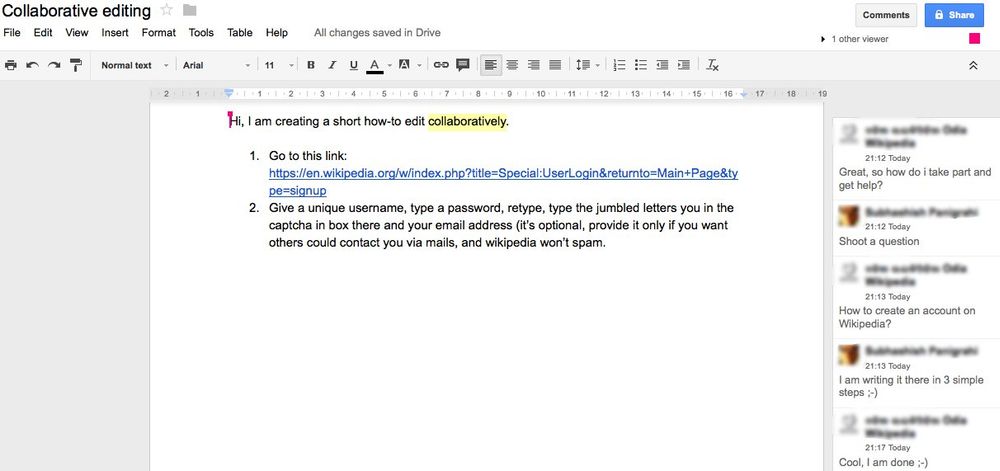
Caption: Collaborative editing in Google Docs (Wikimedia Commons sample). Illustrative of multi-caret co-authoring. Docs-verified reference Oct 21, 2026.
Key features
- Real-time multiplayer editing, comments, and suggestions mode.
- Version history; Share links with view/comment/edit roles.
- Add-ons / Gemini features depending on Google account / Workspace tier.
- Offline mode via Chrome; strong mobile apps.
- Export to DOCX, PDF, EPUB, etc.
Pricing (as of Oct 21, 2026)
- Free for personal Google accounts (storage shared with Drive—quota applies).
- Google Workspace paid editions for businesses (per-user admin, more storage, admin controls)—see Google Workspace pricing for current seat rates.
Pros
- Best-in-class free collaboration.
- No install required; universal link sharing.
- Good enough for articles, proposals, and homework.
Cons
- Large manuscripts get unwieldy (scrolling, outline only).
- Offline / complex formatting still trails desktop Word for some layouts.
- Privacy/compliance may push regulated teams to Workspace or Word.
Best for / Who should skip
- Best for: Students, startups, and co-writing teams on a budget.
- Skip if: You need corkboard novel structure or offline-first desktop ownership.
What we noticed
Docs is the collaboration hub, not the long-form cockpit. Many authors draft in Scrivener/Ulysses, then paste or export to Docs only for editor feedback.
Official link: Google Docs
7. Hemingway Editor — Best readability polish
Official: hemingwayapp.com · Desktop: hemingwayapp.com/desktop · Editor Plus: hemingwayapp.com/hemingway-editor-plus
Verdict: Hemingway is a surgical clarity tool—highlight hard sentences, adverbs, passive voice, and grade level. Use it as a final pass, not your only writing home.

Caption: Hemingway Editor Plus grammar/clarity marketing UI (official hemingwayapp.com asset). Docs-verified Oct 21, 2026.
Key features
- Color-coded readability highlights (web free tier).
- Desktop app for offline editing ($19.99, no AI features).
- Editor Plus subscription: AI sentence rewrites, advanced grammar, tone/length controls, import/export.
- Publish/export helpers (WordPress, HTML, Markdown, Word—feature set varies by edition).
Pricing (as of Oct 21, 2026)
- Free web editor: highlights + readability score.
- Desktop (Mac/PC): $19.99 one-time (explicitly excludes new AI features).
- Editor Plus Individual 5K: $100/year (~$8.33/mo) — 5,000 AI sentence rewrites/mo.
- Individual 10K: $150/year (~$12.50/mo).
- Team 10K: $150/user/year.
- Monthly Editor Plus options exist at a higher effective rate (FAQ cites ~$10/mo vs $8.33 annual).
Docs check (Oct 21, 2026): Desktop and Editor Plus are separate products on Hemingway’s site—do not assume the $19.99 desktop license includes AI rewrites.
Pros
- Instant visual feedback on clarity.
- Cheap desktop option for offline passes.
- Useful teaching tool for concise prose.
Cons
- Can push writing toward flat, over-simple style if followed blindly.
- Weak as a primary long-form organizer.
- Editor Plus AI credits are a recurring cost.
Best for / Who should skip
- Best for: Bloggers, marketers, and editors tightening drafts.
- Skip if: You need project structure or deep literary style reports.
What we noticed
Hemingway shines in a 15-minute clarity pass after Grammarly/ProWritingAid. Ignore “grade level” absolutism for literary fiction—use highlights as clues, not commandments.
Official link: Hemingway Editor
Comparison Table (Pricing & Limits)
| Tool | Model | Free limits (high level) | Entry paid (US, as of Oct 21, 2026) | Export / handoff |
|---|---|---|---|---|
| Scrivener | Per-platform license | 30-day trial | $59.99 desktop | Compile to DOCX/PDF/EPUB/etc. |
| Microsoft Word | Freemium + Microsoft 365 | Word on the web | $99.99/yr Personal | Native DOCX; PDF |
| Grammarly | Freemium SaaS | Basic grammar; 100 AI prompts/mo | ~$12/mo Pro | Works inside host apps |
| ProWritingAid | Freemium SaaS | ~500 words/check; daily caps | ~$120/yr Premium | Word/Docs/Scrivener/web |
| Ulysses | Subscription | Trial | $39.99/yr | DOCX/PDF/EPUB/HTML |
| Google Docs | Free (+ Workspace) | Drive quota | $0 personal | DOCX/PDF/EPUB |
| Hemingway | Free web + desktop + SaaS | Web highlights | $19.99 desktop; $100/yr Plus | Word/HTML/Markdown/PDF (edition-dependent) |
Also Considered
| Tool | Why it’s notable | Why it’s not in the main seven |
|---|---|---|
| Final Draft | Industry screenplay formatting | Niche to screenwriting, not general “writing software” |
| Atticus | Writing + print/ebook formatting for indie authors | Strong niche; overlaps Scrivener + Vellum-style jobs |
| Novlr / LivingWriter | Novel-focused cloud apps | Smaller mindshare vs Scrivener for US SERP intent |
| Notion / Obsidian | Notes, wikis, PKM | Writing-adjacent; weak as dedicated manuscript compilers |
| LibreOffice Writer | Free desktop word processor | Capable, but weaker US collaboration default than Docs/Word |
| ChatGPT / Claude / Jasper | Generative drafting | AI chatbots—not composition IDEs; easy to over-stack in “best writing software” lists |
| FocusWriter | Free distraction-free desktop | Lightweight; fewer export/structure features |
Which Tool Should You Choose?
| Your situation | Start here | Add-on layer |
|---|---|---|
| First novel with lots of research | Scrivener | ProWritingAid or Grammarly |
| Client reports / school papers / resumes | Microsoft Word or Google Docs | Grammarly |
| Write everywhere (email + Docs + Slack) | Grammarly | Keep your existing draft app |
| Fiction self-edit before a human editor | ProWritingAid | Scrivener or Word |
| Apple-only blogger / essayist | Ulysses | Hemingway for clarity passes |
| Team co-writing on a budget | Google Docs | Grammarly |
| Tighten marketing copy fast | Hemingway | Grammarly Pro |
Practical stack we see most often: Scrivener or Word/Docs for drafting + Grammarly or ProWritingAid for line editing + Hemingway for a final clarity skim.
FAQ
What is the best writing software overall in 2026?
There is no single winner. For long-form books, choose Scrivener. For professional documents, choose Microsoft Word. For a grammar layer, choose Grammarly. Match the tool to the job.
What is the best free writing software?
Google Docs is the best free collaborative option. Hemingway’s web editor is free for readability highlights. Word for the web and Grammarly Free cover basic documents and proofreading. Free tiers usually limit AI, word-check length, or desktop features.
Is Scrivener worth it vs Word?
Yes—if you need binder/corkboard/research workflows. Word wins for track-changes collaboration and universal .docx. Many authors use both (draft in Scrivener, deliver in Word).
Grammarly vs ProWritingAid — which should I buy?
Pick Grammarly for everyday, multi-app corrections. Pick ProWritingAid for deep manuscript reports and fiction self-editing. Some writers keep Grammarly Free + ProWritingAid Premium.
Do I need AI writing features?
Optional. Copilot (Word), Grammarly Pro prompts, ProWritingAid Sparks, and Hemingway Editor Plus can speed rewrites—but structure tools (Scrivener/Ulysses) still matter more for finishing a book.
Will these prices change?
Likely. All dollar figures are as of October 21, 2026 (Asia/Shanghai) from official pages. Always confirm checkout.
Methodology & Update Notes
- Review type: Docs-verified (official product, pricing, FAQ, download pages) + cross-check of major 2026 roundups. Not a multi-week hands-on manuscript lab.
- Market: United States intent; USD list prices.
- Affiliate status: None. No referral parameters intentionally added.
- Screenshots: Official vendor marketing/product UI assets where available; Word and Google Docs illustrations include Wikimedia Commons public screenshots clearly captioned. Hero image is Scrivener corkboard UI.
- Changelog: Initial publication October 21, 2026. Next planned price/feature revisit: Q1 2027 or sooner if major licensing changes land.