Best Small Business Management Software in 2026 (SMB Picks)
Author / Publisher: Yang Dan · Desk: Software Reviews Desk · Brand: DirHunt AI
Contact: reviews@dirhuntai.com · About: /about · Methodology: /methodology
Disclosure: No affiliate links. Every product link goes to an official vendor page.
Review type: Docs-verified against official product, pricing, FAQ, and catalog pages. Hands-on lab is limited this pass (no multi-week implementation diary).
Last updated: October 21, 2026 (Asia/Shanghai)
Searching for software to manage a small business usually means something narrower than a generic “business management” roundup: fewer seats, tighter budgets, and tools you can actually stand up in days—not a six-month ERP project.
This guide is built for US solopreneurs and SMBs roughly 1–25 people. We compared seven platforms against official pages as of October 21, 2026, scoring them on time-to-value, honest free/paid paths, and whether they help you get paid, keep books, or run client work without enterprise bloat.
Sister guide (broader stack): For a wider SMB/startup stack that includes modular ERP and denser work-OS picks (Odoo, ClickUp), see our companion roundup Best Business Management Software in 2026. This article stays closer to micro and small-business buying—invoicing, clientflow, free starters, and lean suites.
How to choose in 60 seconds
- Want one suite (CRM + finance + HR + projects) on a small-team budget → Zoho One. - You sell client projects (proposals → contracts → invoices → pay) → HoneyBook. - US books, tax readiness, accountant workflows are the fire → QuickBooks Online. - Freelancer/consultant who lives in estimates, time, and invoices → FreshBooks. - Need free invoicing + bookkeeping to start → Wave. - Growth starts with CRM + marketing + service → HubSpot (Free → Starter). - Need a visual ops board for a tiny team (not your ledger) → monday.com.
Quick picks
| Need | Pick |
|---|---|
| Best all-in-one for small teams | Zoho One |
| Best client-service workflow | HoneyBook |
| Best US financial backbone | QuickBooks Online |
| Best freelancer billing | FreshBooks |
| Best free financial starter | Wave |
| Best free CRM growth path | HubSpot |
| Best visual ops for small teams | monday.com |
Table of contents
- How to Choose in 60 Seconds (box above)
- What SMB Management Software Means in 2026
- How We Evaluated
- Quick Comparison Table
-
- Zoho One
-
- HoneyBook
-
- QuickBooks Online
-
- FreshBooks
-
- Wave
-
- HubSpot
-
- monday.com
- Comparison Table (Pricing & Limits)
- Also Considered
- Which Tool Should You Choose?
- FAQ
- Methodology & Update Notes
- Related Reading
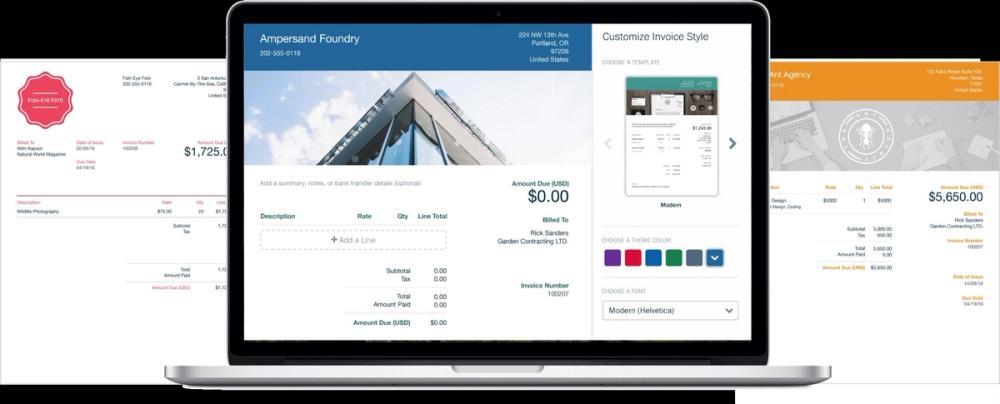
Caption: Real FreshBooks invoice product UI (official marketing asset, Oct 2026). Used as list hero — not a logo collage.
What SMB Management Software Means in 2026
SMB management software is the practical stack owners use to run day-to-day work: get clients, schedule or deliver work, invoice, collect payment, and keep books tidy enough for tax. It overlaps with CRM, accounting, client management, and light work management—but the buying filter for this guide is SMB-first:
| Filter | Why it matters for small businesses |
|---|---|
| Time-to-value | Can a founder go live in hours/days without a partner project? |
| Seat & plan math | Transparent free tiers or low monthly floors for 1–10 people |
| Money path | Invoices, payments, or accountant-ready reports—not just kanban |
| Honest scope | We call out tools that are ops boards or CRM-only vs full suites |
Editorial boundary: We shortlisted tools that a US micro or small business can evaluate this week. Heavy ERP (NetSuite, Business Central) and dense work OSes that need heavy configuration (ClickUp at scale, Odoo implementations) sit in Also considered—they appear in our broader business-management software guide.
How We Evaluated
We ranked tools for US searchers comparing SMB management platforms—owners, ops leads, and freelancers—not mid-market ERP committees.
Criteria
- SMB practicality — Start without a six-month implementation.
- Budget honesty — Published list prices, free tiers, and clearly labeled promos (as of Oct 21, 2026).
- Coverage fit — Customers, work, and/or money—not a single silo pretending to be a full OS.
- Platform fit — Web first; mobile called out when material.
- Upgrade path — What breaks when you grow (client caps, seats, payment fees).
Honesty note (not “Tested” theatre): This pass is docs-verified. We opened official product/pricing/FAQ/catalog pages dated around October 21, 2026 (Asia/Shanghai) and cross-checked SMB roundups (TechBloat-style small-business lists, Dupple/HoneyBook-oriented service guides). We did not run multi-week labs. Where USD figures were JS-gated or geo-shifted (notably some Zoho One Essentials nodes), we omit or flag rather than invent.
Quick Comparison Table
| Software | Best for | Platforms | Free path? | Paid starting point (as of Oct 21, 2026) | Main drawback |
|---|---|---|---|---|---|
| Zoho One | All-in-one suite for small teams | Web + mobile apps | Trial common; not a forever full suite | Flexible User often cited ~US$90/user/mo; All-Employee ~US$37/employee/mo in Zoho licensing materials—confirm live checkout | Suite learning curve |
| HoneyBook | Client projects (proposal→pay) | Web + mobile | Free trial (~30 days) | Starter $29/mo (pricing page); processing fees extra | Not full accounting |
| QuickBooks Online | US books & tax readiness | Web + mobile | Limited Free plan | Simple Start $38/mo list (common 50%×3 mo promo → $19) | Not CRM/PM suite |
| FreshBooks | Freelancer/consultant billing | Web + mobile | 30-day trial | Lite $23/mo list (promo often lower); Plus $43; Premium $70 | Client caps on lower tiers |
| Wave | Free invoicing + bookkeeping | Web + mobile | Starter free | Pro $19/mo or $190/yr; payments/payroll cost extra | Thin controls as you scale |
| HubSpot | CRM-led growth | Web + mobile | Free CRM / free tools | Starter Core seats $20/seat/mo list; new-customer promos (~$7/seat/mo annual) | Not your ledger |
| monday.com | Visual ops for small teams | Web + iOS/Android | Free ≤2 seats | Basic $9 / Standard $12 / Pro $19 seat/mo (annual display) | Not your books |
1. Zoho One — Best all-in-one suite for growing small teams
Official: zoho.com/one · Pricing: zoho.com/one/pricing
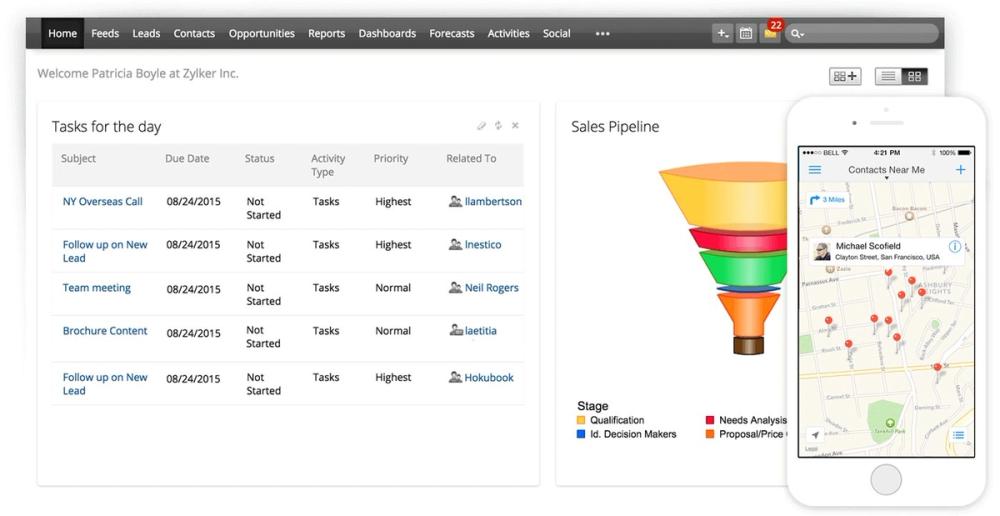
Caption: Official Zoho CRM product visualization (suite component often bundled via Zoho One).
Verdict
If your definition of an SMB management suite is “stop paying five vendors,” Zoho One remains the strongest SMB suite pick in 2026 for breadth-per-dollar. It is a suite, not one mega-screen: CRM, desk, campaigns, books, people, and projects under shared admin—manageable for a 5–25 person company that will actually use several apps.
Key features
- 45–50+ business apps under one admin (edition dependent): CRM, Mail, Cliq, Projects, Books, People, Desk, Campaigns, and more
- Centralized users/permissions and many mobile companions
- Essentials edition for thinner early digitalization; Standard for full platform depth
- AI assistant capabilities marketed across apps (confirm per product)
Pricing (as of October 21, 2026)
- Flexible User pricing for Standard has long displayed around US$90 / user / month on US-facing surfaces—re-confirm on live checkout.
- All-Employee licensing narrative on Zoho materials has cited about US$37 / employee / month when you license every eligible employee—also re-confirm before budgeting.
- Essentials: thinner app set. Exact USD was not reliably readable from JS-rendered price nodes on 2026-10-21; we do not invent a number—open pricing.
- Trials are commonly offered.
Pros
- Extreme breadth on one bill vs stitching five SaaS tools
- Real finance + HR + CRM (not just boards)
- Fits growing SMBs better than NetSuite-class ERP day one
Cons
- Depth and UX vary by app; training still required
- Licensing rules (especially All-Employee) need careful reading
- Overkill if you only need invoices
Best for / Who should skip
- Best for: Small teams that want suite coverage without an ERP RFP.
- Skip if: You only need invoicing or a single CRM—buy FreshBooks, Wave, or HubSpot Free instead.
What we noticed (docs-verified, Oct 21, 2026)
On Zoho’s One pricing FAQ, Essentials vs Standard is framed as early digitalization vs 50+ apps with platform capabilities. Jumpstart/Concierge implementation help is sold separately—budget that if you lack an ops owner.
Official link
2. HoneyBook — Best client workflow for service SMBs
Official: honeybook.com · Pricing: honeybook.com/pricing
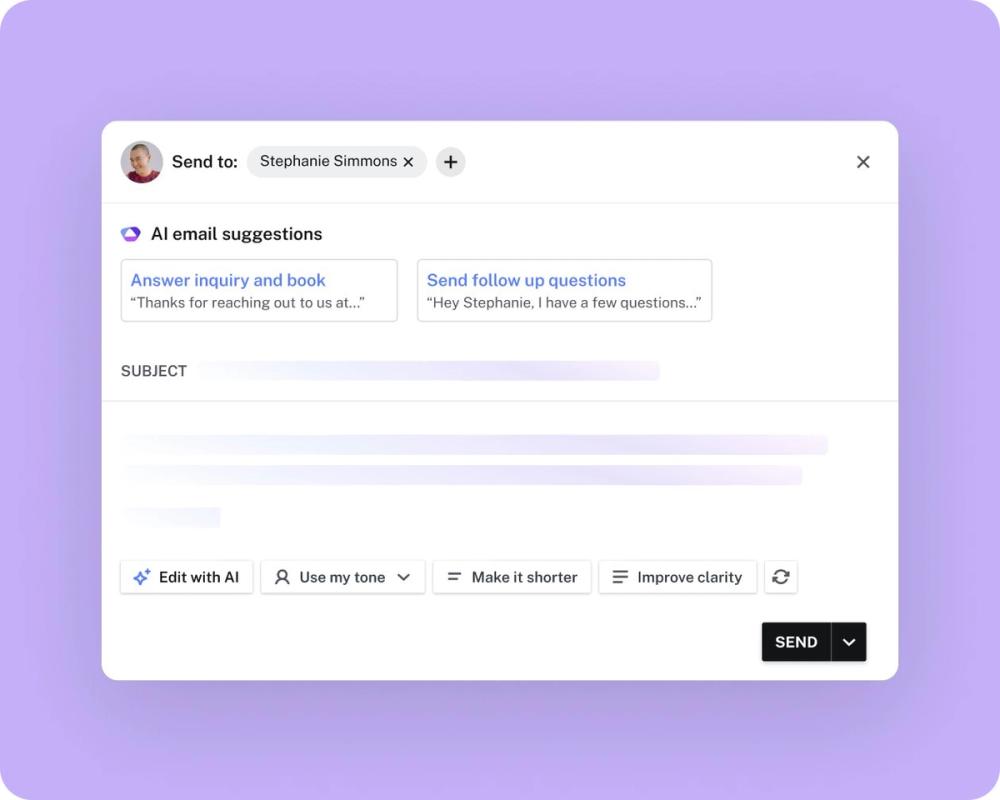
Caption: Official HoneyBook client-facing workflow UI (product marketing asset).
Verdict
For photographers, planners, coaches, consultants, and other client-service small businesses, HoneyBook is often the fastest path from inquiry to paid project. It is clientflow software, not a general ledger—pair it with QuickBooks or Wave when tax season arrives.
Key features
- Proposals, contracts (e-sign), invoices, and payments in one client experience
- Scheduling, lead forms, client portal, templates
- Automations and QuickBooks Online integration on higher tiers
- HoneyBook AI features marketed across plans (confirm live)
Pricing (as of October 21, 2026)
From HoneyBook’s pricing page:
- Starter: $29 / month — unlimited clients/projects, invoices/payments, proposals/contracts, calendar, templates, client portal, basic reports, up to 2 live lead forms
- Essentials: $49 / month — scheduler, automations, QBO integration, up to 2 team members, up to 10 lead forms, SMS reminders, remove branding
- Premium: $109 / month — unlimited team members, priority support, multiple companies, advanced reports
- Free trial (~30 days); 60-day money-back guarantee stated on pricing
- Card processing starts at 2.7% + 10¢; ACH 1.5% (confirm eligibility)
Pros
- Replaces form + contract + invoice + scheduler stack for services
- Unlimited clients/projects on all plans
- Fast onboarding for solo operators
Cons
- Not inventory, manufacturing, or full accounting
- Useful automations sit above Starter
- Payment fees add to total cost of ownership
Best for / Who should skip
- Best for: Service SMBs whose bottleneck is booking and getting paid.
- Skip if: You sell physical products with inventory, or need deep books as the system of record.
What we noticed (docs-verified, Oct 21, 2026)
HoneyBook explicitly markets itself as doing the job of multiple point tools for creatives and consultants. Essentials is the first tier where QBO integration and automations appear—budget that if you already live in QuickBooks.
Official link
3. QuickBooks Online — Best US books & tax backbone
Official: quickbooks.intuit.com · Pricing: quickbooks.intuit.com/pricing
Verdict
If the painful part of “managing the business” is money and tax readiness, QuickBooks Online is still the default US SMB accounting backbone in 2026. It is not a CRM or project OS—pair it with HubSpot, monday, or HoneyBook when those jobs matter.
Key features
- Income/expense tracking, invoicing, bank feeds, P&L and balance sheet
- Accountant collaboration on paid plans
- Mobile app on paid tiers
- Intuit Intelligence / AI features marketed on paid plans (confirm per tier)
- Payroll and payments as related Intuit services (extra)
Pricing (as of October 21, 2026)
From Intuit’s QBO pricing page:
- Free: $0/mo — 1 user, track income/expenses, 2 invoices/mo (or unlimited if QuickBooks Payments qualifies), 1 bank connection, limited reports, no accountant access
- Simple Start: $38/mo list; promo $19/mo for 3 months (50% off) common on page
- Essentials: $85/mo list; promo $42.50/mo displayed
- Plus: $140/mo list; promo $70/mo displayed
- Advanced: $340/mo list; promo $170/mo displayed (higher user counts)
Promos change—treat list prices as the planning baseline.
Pros
- Accountant ecosystem and US tax workflows
- Clear Free → paid ladder for micro businesses
- Strong bank categorization and reporting depth as you upgrade
Cons
- Not a full CRM/PM suite
- List prices climb quickly (Essentials/Plus)
- Headless/docs checks can be flaky; always verify checkout
Best for / Who should skip
- Best for: US SMBs whose accountant already asks for QuickBooks.
- Skip if: You only need simple free invoices (try Wave) or client contracts (try HoneyBook).
What we noticed (docs-verified, Oct 21, 2026)
The Free plan’s two invoices per month cap (unless Payments unlocks more) makes it a starter, not a forever plan for active billers. Simple Start is the realistic paid floor for most solo US operators.
Official link
4. FreshBooks — Best freelancer & consultant billing
Official: freshbooks.com · Pricing: freshbooks.com/pricing
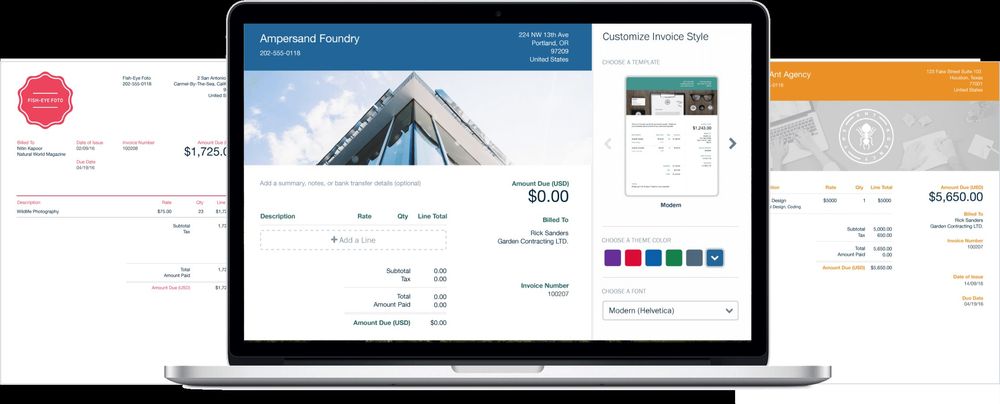
Caption: Official FreshBooks invoice customization UI (product marketing asset).
Verdict
FreshBooks sits in the sweet spot for service freelancers and small consultancies that want estimates, time tracking, expenses, and approachable double-entry reports without QuickBooks ceremony. Client caps on Lite/Plus are the gotcha—count active + archived clients before you buy.
Key features
- Invoices, estimates, proposals/retainers (plan-dependent), deposits, late reminders
- Time tracking, expenses, mileage; bank import and accountant access on higher plans
- Online card/ACH payments; BNPL options marketed
- Project profitability tools on higher tiers
- 30-day free trial (no credit card required, per pricing FAQ)
Pricing (as of October 21, 2026)
List prices on FreshBooks US pricing (promos like 80% off for 4 months often appear—budget the Was price):
| Plan | List (USD/mo) | Billable clients |
|---|---|---|
| Lite | $23 | 5 |
| Plus | $43 | 50 |
| Premium | $70 | Unlimited |
| Select | Custom | Unlimited + extras |
Add-ons observed: Advanced Payments $20/mo; Team Members $11/user/mo; Payroll $40/mo + $6/user/mo. Payment processing commonly cited around 2.9% + $0.30 (card) / 1% ACH—confirm on payments docs.
Pros
- Built around getting freelancers paid
- Clear client-based plan ladder
- Stronger “service business” UX than raw ledgers for many solos
Cons
- Lite’s 5-client cap is easy to outgrow
- Not ideal for complex inventory/multi-location retail
- Promotional pricing can obscure long-term cost
Best for / Who should skip
- Best for: Consultants, creatives, and agencies billing by project or time.
- Skip if: You need free forever books (Wave) or enterprise inventory (Odoo path).
What we noticed (docs-verified, Oct 21, 2026)
FreshBooks’ 2026 price-change FAQ confirms Lite/Plus/Premium list moves (USD $23 / $43 / $70 monthly). Annual plans advertise ~10% off. Always model list + processing + team add-ons, not just the promo tile.
Official link
5. Wave — Best free financial starter for micro-businesses
Official: waveapps.com · Pricing: waveapps.com/pricing

Caption: Official Wave Financial brand/product banner (marketing asset used when in-app UI CDN posters were low-resolution).
Verdict
Wave is the clearest $0 core answer when a US/Canadian micro-business needs unlimited invoices and basic bookkeeping. It is not a CRM, contracts platform, or payroll suite by default—payments, receipts automation, and payroll cost extra.
Key features
- Unlimited estimates, invoices, bills, and bookkeeping records on Starter
- Mobile app invoicing
- Optional online payments; Pro adds bank auto-import, receipt capture, late reminders, collaborators
- Wave Advisors bookkeeping packages for hands-off books (higher price band)
Pricing (as of October 21, 2026)
- Starter: Free — unlimited invoices/estimates/bills/records; card payments 2.9% + $0.60 (Amex 3.4% + $0.60) when enabled
- Pro: $19 USD/month or $190/year — discounted card fees for first 10 tx/mo (2.9% + $0 / Amex 3.4% + $0 then standard), auto-import, auto-categorize, unlimited receipt capture, automated reminders
- Advisors packages starting around $149+/month (confirm live)
- Receipt scanning historically also sold as add-on on some paths—verify current add-on tiles
Pros
- Real free forever core for micro operators
- Unlimited invoices without a Lite-style client cap
- Simple upgrade when bank automation matters
Cons
- No time tracking / proposals / contracts like FreshBooks or HoneyBook
- Regional focus (US/Canada) and payment eligibility checks
- Controls and collaboration thin until Pro
Best for / Who should skip
- Best for: Solopreneurs minimizing subscription cost while invoicing.
- Skip if: You need e-sign contracts, deep inventory, or multi-entity controls.
What we noticed (docs-verified, Oct 21, 2026)
Wave’s help center (updated Oct 2026) still frames Starter as free basic accounting/invoicing and Pro as the paid automation tier. Legacy account migrations in 2026 mean older “everything free” stories may no longer apply—new signups should assume Starter/Pro.
Official link
6. HubSpot — Best free CRM growth path for SMBs
Official: hubspot.com · Starter: hubspot.com/products/crm/starter · Catalog: legal.hubspot.com/hubspot-product-and-services-catalog
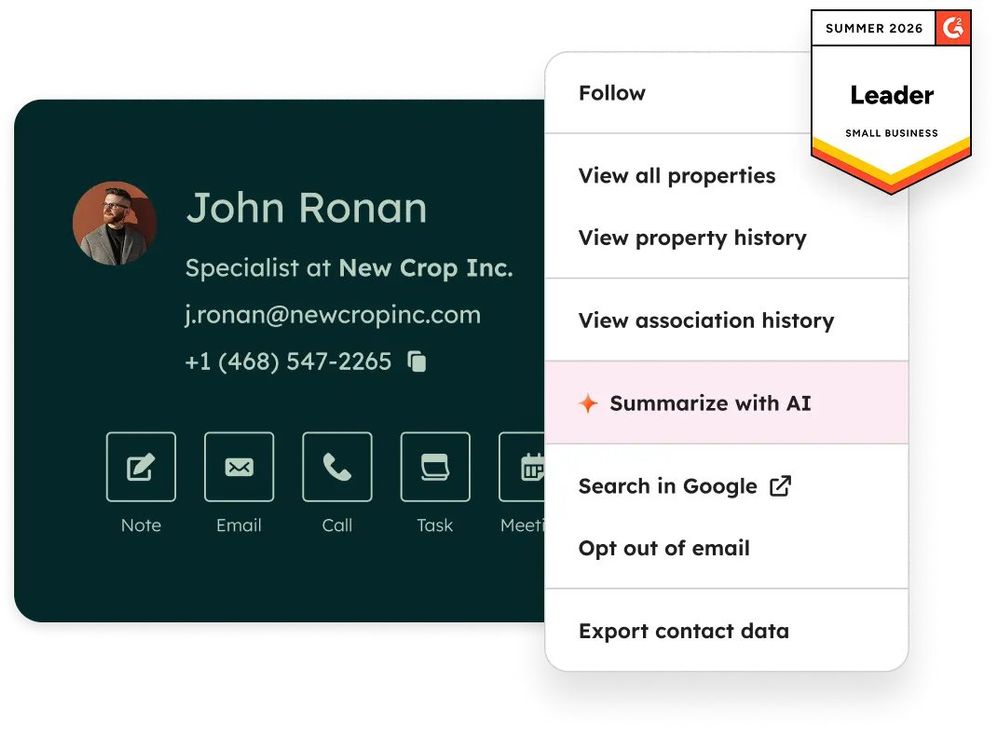
Caption: Official HubSpot CRM product UI (marketing asset).
Verdict
When “management” for your small business means pipeline, email, and customer context first, HubSpot’s Free tools plus Starter seats are the cleanest CRM-led path. It will not replace QuickBooks for books.
Key features
- Free CRM foundation (contacts, deals, basic automation limits)
- Starter removes branding, raises limits, adds seats/support, more automation
- Marketing/Sales/Service hubs scale into Professional/Enterprise (out of scope for most micro SMBs day one)
- HubSpot Credits power some AI/agent features (Starter includes a monthly credit allotment—confirm catalog)
Pricing (as of October 21, 2026)
- Free tools: $0
- Starter Core seats: $20 / seat / month list (Product & Services Catalog)
- New-customer promos commonly show ~$7/seat/mo billed annually or ~$10/seat/mo monthly (up to ~65% off)—promos change
- Marketing contacts, payments processing, and credit overages can raise the bill
Pros
- Best-in-class free CRM on-ramp for SMBs
- Clear documentation via legal catalog
- Grows with you into marketing/service without a rip-and-replace
Cons
- Not accounting/ERP
- Professional tiers get expensive fast
- Seat + contact + credit math needs a spreadsheet
Best for / Who should skip
- Best for: Sales-led small businesses and startups building a pipeline.
- Skip if: Your only pain is invoicing—use Wave/FreshBooks/QBO.
What we noticed (docs-verified, Oct 21, 2026)
HubSpot’s Starter comparison table still contrasts Free (branding, 2 users, tight automation) vs Starter (unlimited purchased seats, higher limits). Use the legal catalog for durable list prices when marketing tiles disagree.
Official link
7. monday.com — Best visual ops board for small teams
Official: monday.com · Pricing: monday.com/pricing
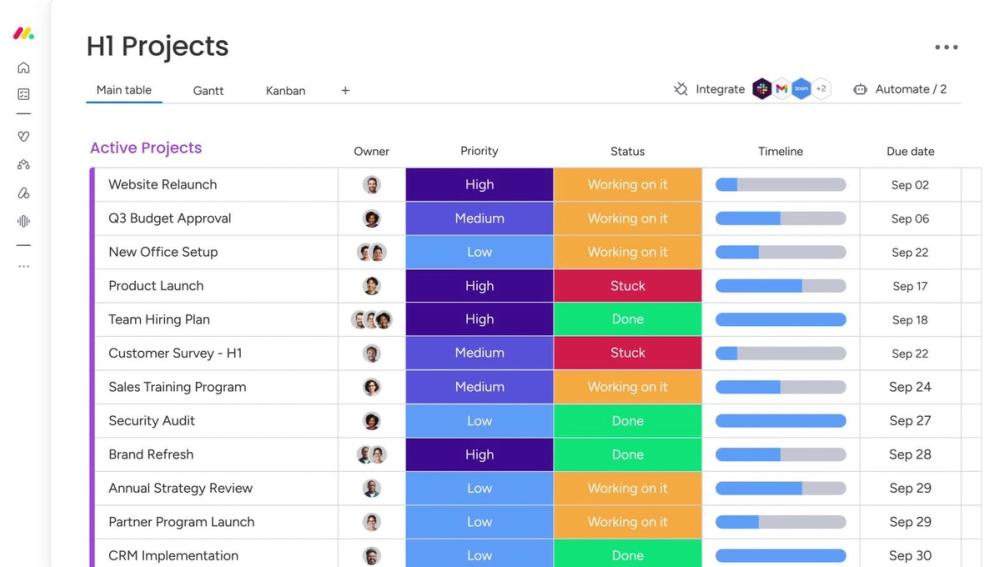
Caption: Real monday.com work board UI (official product marketing asset).
Verdict
monday.com is excellent small-team operations software—boards, dashboards, light automations—but it is not your books or full client contracting stack. Use it when the bottleneck is “who is doing what by when,” not “file my taxes.”
Key features
- Boards, docs, templates; timeline/Gantt on Standard+
- Free plan for up to 2 seats / limited boards
- Automations & integrations scale by plan
- AI credits/agents marketed on paid plans (confirm credit packs)
- CRM and other monday products exist separately—this review focuses on Work Management pricing
Pricing (as of October 21, 2026)
Work Management annual display prices (per seat/month; seat minimums apply on paid plans—commonly marketed from ~3 seats):
- Free: $0 — up to 2 seats, up to 3 boards / 3 docs
- Basic: $9 / seat / mo
- Standard: $12 / seat / mo
- Pro: $19 / seat / mo
- Enterprise: custom
Monthly billing costs more; AI credit bundles may appear as line items on pricing calculators.
Pros
- Fast visual adoption for non-technical teams
- Generous template library
- Free tier to prove the workflow
Cons
- Not a ledger or tax system
- Paid plans expect multiple seats (solo economics weaker)
- Easy to confuse with monday CRM pricing pages
Best for / Who should skip
- Best for: Small teams coordinating delivery across marketing/ops/support.
- Skip if: You need invoices and books in the same login—look at Zoho One, FreshBooks, or QBO + a lighter board.
What we noticed (docs-verified, Oct 21, 2026)
monday’s pricing FAQ still notes Free for freelancers/individuals and paid plans with seat-based math. For a 2-person studio, Free may suffice; at 5–10 people, Standard is the usual “automations + guests” tier.
Official link
Comparison Table (Pricing & Limits)
| Tool | Free forever? | Entry paid (list, Oct 21, 2026) | Hard limit to watch | SMB fit score (editorial) |
|---|---|---|---|---|
| Zoho One | Trial, not full forever suite | ~$90/user flex or ~$37/employee all-employee (verify) | Learning curve / licensing | High if multi-app |
| HoneyBook | Trial | $29/mo Starter | Not full accounting; card fees | High for services |
| QuickBooks Online | Limited Free | $38/mo Simple Start | Invoice caps on Free; list price climb | High for US books |
| FreshBooks | Trial | $23/mo Lite | 5 clients on Lite | High for freelancers |
| Wave | Yes (Starter) | $19/mo Pro | Payments/payroll extras; scale controls | High for micro $0 start |
| HubSpot | Yes (Free CRM) | $20/seat Starter | Contacts/credits/seats | High for CRM growth |
| monday.com | Yes (≤2 seats) | $9/seat Basic | Not books; seat minimums | Medium–high for ops |
Also Considered
| Tool | Why it didn’t make the main seven |
|---|---|
| Odoo | Excellent modular/light ERP—but implementation effort is higher than most micro-SMB week-one needs. Covered in our broader BMS guide. |
| ClickUp | Dense work OS with aggressive seat pricing; feature overload for many first-time SMB buyers. See sister guide. |
| Xero | Strong cloud accounting alternative to QBO; we prioritized QBO for US accountant ubiquity in this pass. |
| Basecamp | Classic small-team project hub—lighter than monday but thinner marketplace/automation story for 2026 buyers. |
| Jobber | Excellent for field-service SMBs; too vertical for a general SMB management main list. |
| Bonsai / Dubsado | Credible HoneyBook alternatives for freelancers; we picked HoneyBook as the category representative. |
| NetSuite / Business Central | Real ERP—poor day-one buy for 1–10 person shops. |
Which Tool Should You Choose?
- Client-service business (proposals, contracts, pay) → HoneyBook (+ QuickBooks or Wave for books).
- US tax/accountant workflow is the fire → QuickBooks Online.
- Freelancer billing + time/expenses → FreshBooks.
- Need $0 invoices/books to start → Wave.
- Pipeline + marketing first → HubSpot Free → Starter.
- Replace five apps with one suite → Zoho One.
- Tiny team execution boards → monday.com.
Many healthy small businesses run two systems: Wave or QBO + HubSpot, HoneyBook + QBO, or FreshBooks + monday. Forcing one login to do everything is optional—not mandatory.
FAQ
What is the best small business management software in 2026?
There is no single winner. For suite coverage, start with Zoho One. For client-service workflows, HoneyBook. For US books, QuickBooks Online. For $0 financial basics, Wave. Match the bottleneck, not the buzzword.
Is small business management software the same as ERP?
Usually no. ERP implies deeper finance, inventory, and often multi-entity controls. Zoho One and Odoo can grow toward broader ops; NetSuite/Business Central are ERP-class. HoneyBook, HubSpot, monday, FreshBooks, and Wave are not full ERPs.
Can I run a small business on free plans alone?
Partially. Wave Starter, HubSpot Free, monday Free (2 seats), and QuickBooks Free (tight invoice caps) help. Active billers and multi-person teams almost always need paid seats or will hit limits.
FreshBooks vs QuickBooks Online vs Wave — which should I pick?
Choose Wave to minimize subscription cost. Choose FreshBooks if estimates/time/client billing UX matter most. Choose QuickBooks Online if your US accountant or tax workflow already assumes QBO.
HoneyBook vs FreshBooks — what’s the difference?
HoneyBook emphasizes inquiry→proposal→contract→payment clientflow (and scheduling). FreshBooks emphasizes invoicing, time, expenses, and accounting reports. Many creatives use HoneyBook operationally and still export or sync to accounting software.
Do you use affiliate links?
No. DirHunt AI product links in this article point to official vendor pages only.
Methodology & Update Notes
- Brand: DirHunt AI software reviews · Author: Yang Dan
- Keyword focus: US informational intent for small business management software / SMB management tools
- Primary sources: Official product, pricing, FAQ, and HubSpot legal catalog pages checked October 21, 2026 (Asia/Shanghai)
- Secondary consensus: SMB-oriented roundups (e.g., TechBloat-style by-business-type lists); sister DirHunt BMS article for overlap discipline
- Not performed: Multi-week implementation diaries, payroll compliance audits, pen-tests
- Affiliate status: None
- Corrections: Seat prices, promos, AI credits, and payment fees move—re-verify on vendor checkout. Zoho One Essentials USD intentionally omitted when not verifiable from live rendered nodes.
Changelog — October 21, 2026 (Asia/Shanghai): Initial DirHunt AI SMB-focused roundup (7 tools). Differentiated from Best Business Management Software 2026 by swapping in FreshBooks + Wave, dropping Odoo + ClickUp from the main list, and reordering for micro/SMB time-to-value.
Related Reading
- Best Business Management Software in 2026 — broader SMB/startup stack (includes Odoo & ClickUp); this page stays more micro/SMB.
- Best Free Drawing Software in 2026
- Best Free Video Editing Software in 2026
- Best Video Editing Software for Beginners in 2026